Please see below for more detailed instructions.
Simple Transfer using BLF Key
- If you have a BLF (Blank Lamp Field) Key provisioned on your desk phone, you can simply press the BLF key to the user you wish to transfer to, and then hang up the phone. A BLF key will manifest as a button on the display that simply says the name of the user associated with the extension that you wish to transfer to.
Hard Transfer
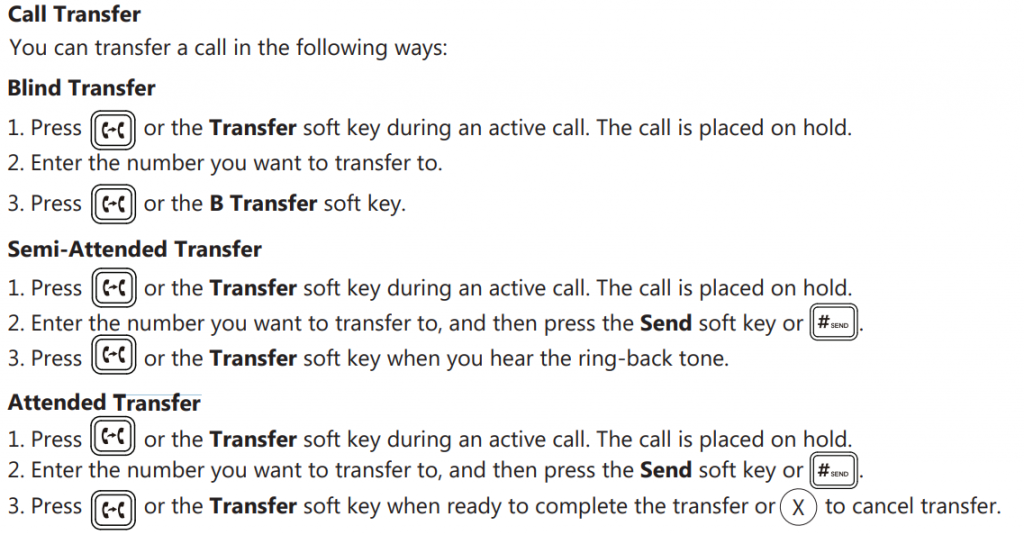
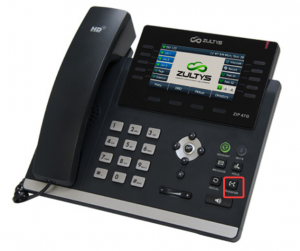
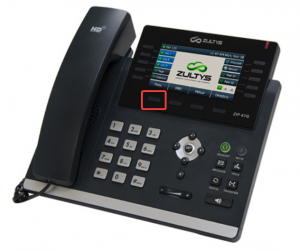
- While on a call, press the transfer button. There are two options for this. The first is the hardcoded button on the bottom right of the phone as show in red in picture 1a. The second is the softkey in picture 1b. Please note that the softkeys are adaptive and will change based on what you are doing.
2. Dial the extension or phone number that you want to transfer to.
Press the transfer key again to send the call off, then hang up.
Soft Transfer
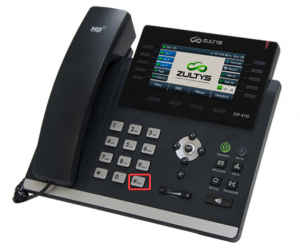
- This process is the same as the process above until step three. once you have dialed the extension or number you would like to transfer to, press the send button (Shown in picture 2a) which will connect you to the party being transferred to.
- Once you are finished talking to them, you can then press transfer to send the caller through.